Whether you are planning to stay entertained or get work done while you are 33,000 feet above the ground, you might be wondering if you can bring and use a laptop on a plane.
Well, the short answer is YES, you can bring a laptop on a plane. and it is highly recommended to place your laptop in your carry-on or personal item bag rather than checked luggage. This keeps your device safe from damage, prevents theft, and adheres to strict safety guidelines regarding lithium-ion batteries
In this post, I will cover everything you need to know about take and using laptops on planes, share some tips and tricks, and discuss some of the best laptops for travel that I’ve personally tried and tested.
Let’s kick things off.
TL,DR
You can bring a laptop on a plane and use it during the flight without any issues.
It is best to pack your laptop in your carry-on or personal item instead of your checked bag to make sure it is safe.
At airport security, you will need to remove your laptop from your bag and place it in a separate bin for screening.
Before traveling, make sure your laptop is fully charged, as not all aircraft provide power outlets or USB charging ports.
Before you go ahead and pack your laptop, it is a good idea to know what to expect at the security checkpoint.
The Transportation Security Administration (TSA) are responsible on what you can and can’t bring on place for flights with and from the U.S.
On their websites they stated that you can bring laptops through the security checkpoint.
Screenshot from the TSA website
However, unless you have TSA PreCheck, you will need to remove your laptop, along with any electronics larger than a cell phone, from your bag and place it in a separate bin for additional screening.
If possible, pack your laptop in a separate compartment or bag so you can easily take it out at the security checkpoint and put it back after clearing security.
To make sure your laptop stays safe during security checks, remember to send it through the scanner last when placing it in a separate bin. If you send it through first while you’re still waiting in line, someone could potentially take it and leave before you pass through security. So be careful and keep an eye on your belongings
You don’t need to worry about the weight of your laptops, as most U.S. airlines do not have weight restrictions for carry-on bags.
The FAA and the TSA recommend taking laptops with installed lithium batteries on board the airplane instead of sending them in the cargo hold.
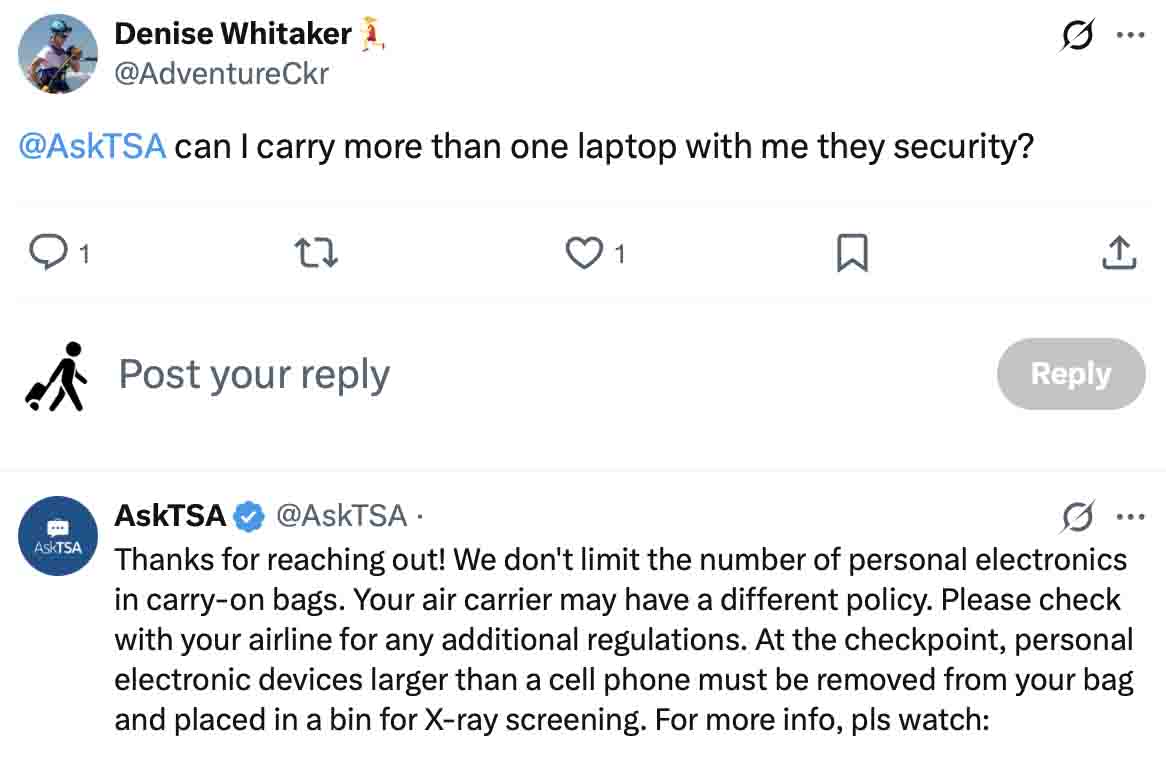
I fond this answer from the AskTSA team replying to Denise that they don’t limit the number of personal electronics in carry-on bags.
But he will need to keep in Lind his airline carry-on size and weight.
Also he will need to remove any laptop he brings and place them in a bin for X-ray screening.
Can You Use a Laptop On a Plane?
You can use your laptop on a plane, but you can’t use it while the plane is taking off or landing.
This is because, during those times, it is important to pay close attention to the instructions from the flight crew and be prepared for any emergencies.
The FAA and airlines also recommend avoiding laptop use during takeoff and landing to ensure a quick and unobstructed evacuation in the event of an emergency.
In the event of turbulence, a laptop can become a projectile and injure someone if it is not properly stowed.
Once the plane is in the air and the seatbelt sign is turned off, you are free to use your laptop to work, watch Netflix, play games, or do other activities to pass the time.
According to ABC News, about 37% of travelers use tablets on flights, which is almost the same as the number of people using laptops
Other Things To remember Before Using a Laptop
Using and traveling a laptop on a plane is not complicated.
Internet Connection And Charging
The only connection you can use on a plane is the inflight WiFi, which usually comes with additional charges.
You can’t use cellular data even if your computer has a SIM card; you will need to turn on Airplane Mode.
If you are flying with an airline that charges an arm and a leg for inflight Wi-Fi, consider downloading entertainment such as movies, music, games, or TV shows before your flight.
Some airplanes may have different power outlets or may not have charging ports at all, so make sure your laptop is fully charged before heading to the airport.
Power banks under 100Wh are allowed on planes, or you can pack an extra battery if your laptop has a removable battery.
If you want to watch or listen to something on your laptop, make sure you use headphones or earbuds so you don’t disturb your fellow passengers.
You should also keep the volume at a reasonable level and avoid any content that might be offensive or inappropriate for other passengers to see or hear.
Packing Laptops For a Flight
Use a good bag for your laptop
Always remember to place your laptop in a sturdy and durable personal item rather than a carry-on bag.
Carry-on bags need to be stowed in the overhead compartment most of the time. Additionally, carry-on bags are more likely to be gate-checked if overhead bin space runs out or if the bag exceeds the airline’s size limits.
You don’t want your laptop ending up in the airplane cargo hold. Checked bags are not handled gently and can get lost, damaged, or even have items stolen from them.
If you want to learn more about the pros and cons of traveling with laptops, you can check out this post on Love And Road.
Laptop Recommendations To Use While Traveling
I’ve searched out some laptops for travel, and here are the ones I think are the best.
Laptop
Size
Weight
Battery Life
Performance
Durability
Price
Apple MacBook Air M1 (my favorite)
13.3 inches
2.8 lbs
Up to 18 hours
Excellent
High
$999
Acer Swift 5
14 inches
2.3 lbs
Up to 15 hours
Very good
Medium
$999
ASUS Zenbook 14 Flip OLED
14 inches
2.9 lbs
Up to 16 hours
Very good
Medium
$799
Lenovo IdeaPad 3 Chromebook
11.6 inches
2.4 lbs
Up to 10 hours
Good
Low
$229
Microsoft Surface Go 3
10.5 inches
1.2 lbs
Up to 11 hours
Good
Medium
$399
This table is a comparison of different laptops criteria like performance, battery life and durability
Final Thoughts On Using Laptops On a Plane.
Taking and using a laptop on a plane is a great way to stay entertained or catch up on work during a flight.
In fact, if you’re a blogger or someone who works while traveling, the time you spend on a plane can be a great opportunity to be productive.
A smartphone simply can’t do that as effectively.
But there are some important rules to remember:
You will need to remove your laptop at the security checkpoint and place it in a separate bin for additional screening.
Do not use your laptop while the plane is taxiing, taking off, or landing, as it could obstruct evacuation routes in an emergency.
I hope this helps.
Happy travels.
FAQ About Bringing a Laptop on a Plane
Can you put a laptop in checked luggage?
You can put a laptop in checked luggage, but it’s usually not a good idea. Your laptop is expensive, fragile, and contain lithium batteries. So keep your laptop in your carry-on or personal item to protect it from damage, theft, and rough baggage handling.
Can you bring a laptop in my personal item?
Yes, most travelers carry their laptops in a backpack, laptop bag, or purse that counts as a personal item. As long as the bag fits under the seat in front of you and meets your airline’s size requirements, you’re good to go.
How many laptops can you bring on a plane?
There is no TSA limit on the number of laptops you can bring on a plane. Many people travel with a work laptop and a personal laptop without any issues. If you want bring more than one laptop, especially brand-new ones, customs officials may ask additional questions when traveling internationally.
Do you have to take your laptop out at airport security?
Yes. In most airports, you will need to remove any electronics from your bag to go through the security.
Do you need to put your laptop in Airplane Mode?
If your laptop has a SIM card, you will need to enable Airplane Mode before takeoff. You can still use Wi-Fi and Bluetooth during the flight if your airline allows it.
Can you charge your laptop on a plane?
Yes many aircraft have power outlets or USB charging ports at the seat, especially on longer flights.
Can you use your laptop during an international flight?
Yes, laptops are allowed on international flights just like they are on domestic flights.
Can you bring a new laptop in its original box on a plane?
Yes, bringing a new laptop in its original box is generally allowed in both carry-on and checked baggage. And its more easy when going through the security checkpoint.
Love this post about using a laptop on a plane? Pin it for later!
Gargie, is writer, traveler & a digital marketing specialist
passionate about traveling and exploring new cultures. She is a savvy traveler who likes to pack light, testing various luggage brands and seeking out budget-friendly airline options. Gargie enjoys creating unique recipes when she’s not on the go.