Planning a weekend trip, a dinner, or a shared event? all this often leads to one question: who owes what? and who pays the most?
But don’t worry, you don’t’ need to track your expenses or bills manually or in a spreadsheet.
I built this reliable online expenses split calculator that you can use for free and track your spending and share it with your friends, roommate or coworkers.
This trip expense splitter is different from other apps because it’s easy to use and private.
Trip Expense Splitter Calculator
Split bills fairly and see who owes whom instantly
Add Participants
Add Expense
Summary
Who Owes Whom
Example: Weekend Trip Expense Split
Using the calculator for a weekend trip to Walt Disney.
Let’s say you, me (Gie) and Ava want to enjoy some time and go on a weekend trip meanwhile visit Walt Disney World in Orlando, Florida:
- You pay $300 for the hotel
- Gie (me) pays $150 for gas
- Ava pays $120 for meals
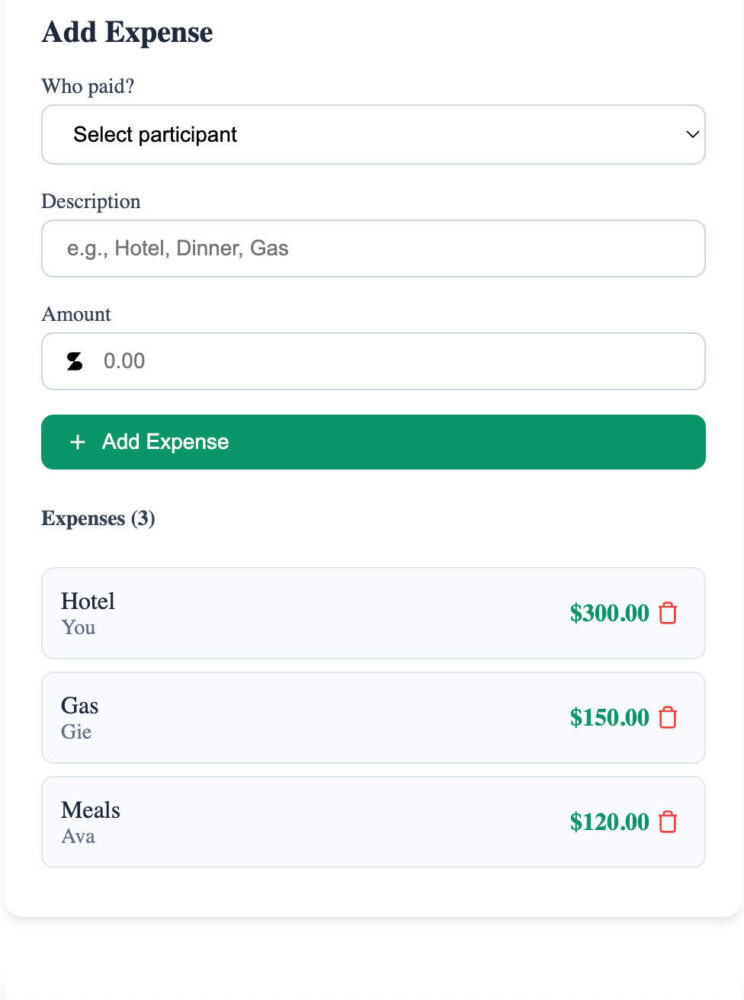
The total spent is $570.
So the calculator split it equally for three of us, each of us should pay $190.
- Your balance: +$110
- (Gie) my balance: -$40
- Ava’s balance: -$70
Now you can tell that Ava and I need to open our wallets to pay you, because you’re the one who spends the most:
- Ava owes you $70
- And I owe you $40

Simple and easy, no more guessing or spreadsheets.
How to Use the Expense Split Calculator?
This trip expense splitter is a free online calculator that you can use and your mates to track and manage any expenses during your trip.
You can also use it for a restaurant bill, a night out, or any other shared expenses and calculates each person’s fair share automatically no Excel formulas and no math required.
You can:
- Add your friend or travel buddy by name
- Add as many expenses as you want with who paid and how much
- Instantly see the total, balances, and who needs to pay the other
- Then you can export everything to a CSV file send it to your friend or just to keep it in your phone
Keep in mind that you don’t to log in or need any data storage.
How do I manually calculate shared expenses?
If you want to calculate split expenses manually here is how to do it:
1. Make a list of your group
First write down everyone that is part of the group.
They can be the people you travel with, your friends, the people in your apartment, or the family members.
You need a complete list of all the participants.
2. Write down everything that was spent
Don’t forget any expenses, like hotel bookings, dinner, or taxi fares.
For each item, you need to write three things:
- How much the item or the activity cost.
- Who paid for it.
- Who benefits from that cost (sometimes only three out of four people went to that museum or stays in the hotel)
Note: you can’t sum up everything now, unless all the activities and items are shared by all the participants.
3. Calculate each person’s fair share
For every single bill, you need to divide the total cost by the number of people sharing it.
This gives you the exact amount that everyone owes for that one thing.
Example: If you are four people and the dinner cost $60 but only 3 people shared it, then everyone needs to pay $20.
4. Keep track of the expenses
As you go, keep track of two things:
- How much they have paid out of their own pocket.
- How much they owe in total.
A basic spreadsheet or the expense split calculator above will work perfectly for this.
5. The total
When your trip or the event is over it is the moment of truth.
- See what each person should have paid (all their shares added up) to what they actually paid.
- The difference tells you who needs to send money and who needs to get a refund. This makes the final payment clear and easy, so everyone walks away feeling like the split was fair.
Frequently Asked Questions about the Expense Split Calculator
What is an Expense Split or Split Bill Calculator?
An expense split or split bill calculator is a free online calculator that is able to fairly divide shared expenses among a group. It automatically calculates and displays who owes whom based on what they paid, so you’ll never have to mess with spreadsheets or calculate manually.
How does the Expense Split Calculator work?
You simply add all the people by name, then add every expense along with the amount and who paid. The calculator will instantly compute what everyone paid and show how much each person needs to pay for the other. You can also export the results as a CSV file so other people may use them.
How do I split bills and expenses evenly between a group?
To split up equally, make sure you have everyone who has paid something included. If a person did not share in a meal or had the same hotel, you can exclude them from that specific cost. The calculator automatically splits so everyone only pays what they owe.
Can one use Excel to split up costs?
You can use Excel if you want, but it will take some time to enter formulas and track who owes whom. This calculator does it all instantly and correctly without having to manually set anything up.
Can I include tax or tips in the calculation?
Yes, you can include tax or tips by putting in the amount you paid including those fees. The calculator will divide the amount between those splitting the cost.
Is this an expense tracker or a bill splitter?
This will work to split group expenses, because It doesn’t store or keep track of your costs over time, which makes everything simple and safe.
Do you need to sign up or register?
You don’t need to sign up to use the calculator, and it does not keep or register any personal information.
Is this a free split bill calculator?
This is completely a free tool to use. There are no sign-ups, fees, or any such hidden charges just open it and start adding charges and users.
Can I use it on my phone or tablet?
You can use it in your phones, tablets, and computer without any issues.
What types of expenses can I split?
You can use it to split bills like holidays, dining, parties, group gifts, home power bills, or any other situation where several people are sharing the same thing.
Can the results be exported or shared?
You can even export your results as a CSV file and send it via email or message with your coworkers, roommates, or friends.
Why is this tool special compared to other apps?
Unlike other cost-splitting apps, this calculator is fast, safe, and doesn’t require installation or registration by email.
Related Calculators
- Airlines Luggage Size And Weight Calculator ( Free Tool )
- Luggage Volume Calculator, Quickly Calculate Your Bag’s Capacity
- Travel Packing Calculator & Clothing Weight Calculatorhttps://travelclosely.com/2026/09/27/travel-packing-calculator/
- Travel Budget Calculator, Free Traveling Budget Calculator By Country
- Cabin Luggage Size Checker , Find If Your Bag Fits
- How To Calculate Linear Inches? Linear Inches Calculator
- Trip Countdown Calculator
- Free Backpack Weight Calculator