SeatGuru is a go-to website that will help you find the best seats on any flight, based on detailed seat maps, user reviews, and expert tips.
Have you ever booked a flight and wondered if you got the best seat possible? Or have you ever boarded a plane and felt envious of the passenger who got more legroom, a reclined seat, or more privacy? If you answered yes, then you need to know how to use SeatGuru.
In this detailed guide, I will show you how to use SeatGuru, review SeatGuru so you can get the most out of your next flight.
Let’s get started.
TL;DR
- SeatGuru helps you find the best seats with maps, reviews, and tips.
- Green seats are best: more legroom, recline, or privacy.
- Yellow seats have some drawbacks like less space or being near bathrooms.
- Red seats are bad and should be avoided.
- White seats are standard with no special features.
- Enter your airline, flight number, or airports to see seat maps.
- Passenger reviews show comfort, service, cleanliness, and photos.
- SeatGuru can also help find cheap flights, rental cars, and vacation deals.
- Alternatives include SeatMaestro, ExpertFlyer, Skytrax, SeatExpert, and SeatPlans.
- The SeatGuru app doesn’t work, but the website works on phones.
- Maps may be outdated, so check your airline if needed.
- Use SeatGuru to pick the best seat and make your flight more comfortable.

What is SeatGuru & How does it work?
SeatGuru is the best free website for airline seat maps, founded in 2001 by a frequent flyer named Matthew Daimler.
He wanted to create the go-to resource that would help travelers find the best seats on any plane, based on his own experience and research.
He started by collecting seat maps from various airlines and adding his own comments and ratings on each seat.
He also invited other travelers to submit their experiences and photos of their seats in comments.
SeatGuru became a well known and trusted source of information for millions of travelers around the globe.
In March 2007, SeatGuru was acquired by TripAdvisor, one of the largest travel platforms in the world, with a lot of seat maps (over 1,100) from more than 160 airlines, covering over 90% of the world’s flights.
It also has thousands of user feedback entries and photos, as well as expert advice on how to get the best seat on a plane.
How to Use SeatGuru?
So how does SeatGuru work?
Using SeatGuru is easy and straightforward. Here are the steps to follow using your phone:
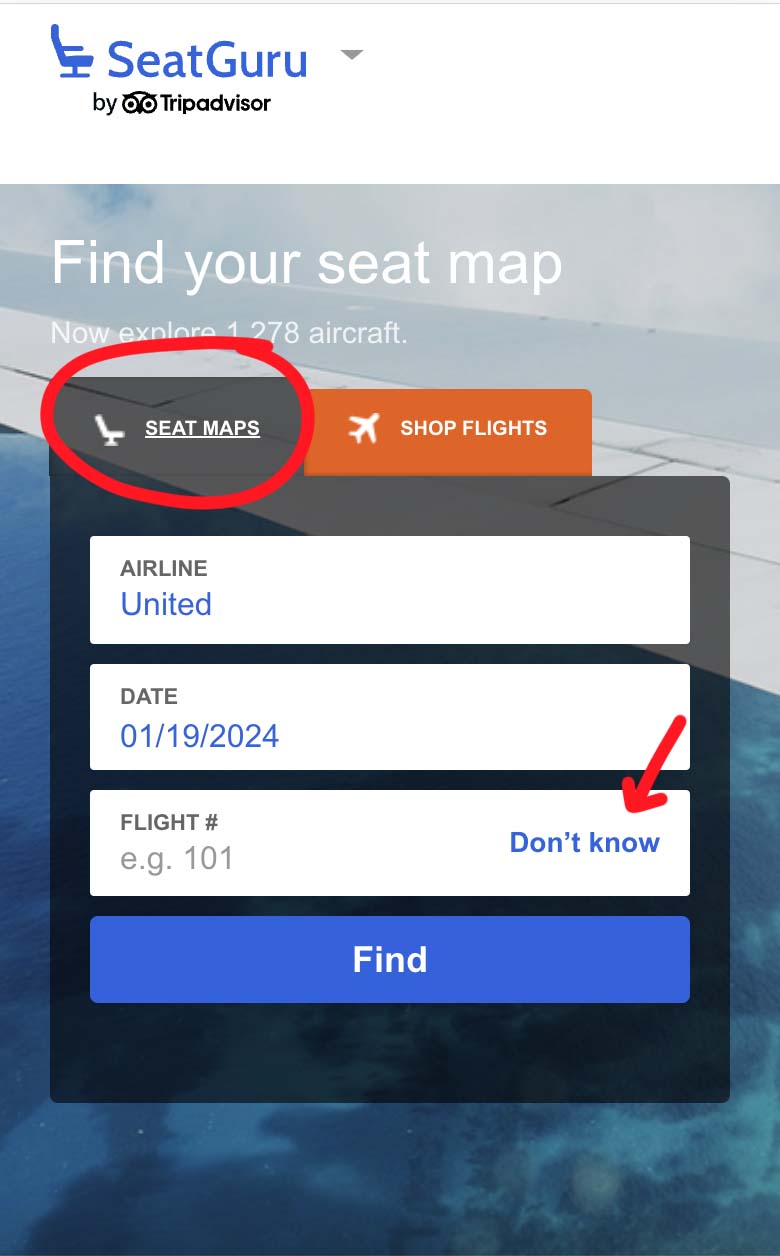
- First you can find SeatGuru by typing www.seatguru.com in your browser, or just go to SeatGuru.com, on the homepage click on Seat Maps (you can select it in the drop-down menu near the SeatGuru logo), select your airline, flight date, and add the flight number, then hit “Find”.
If you don’t have a flight number, you can click on “Don’t know” so you can enter your departure and destination airports instead.
2. Now provide your specific itinerary details, and SeatGuru will retrieve flights heading to that destination on the specified date.

As an example, I’ve chosen a flight from Los Angeles, California, to Chicago, Illinois.
There are a total of six United Airlines flights heading to Chicago, Illinois.

3. Select your flight
The flight number UA 1069 is operated by a Boeing 737 Max 9 (7M9).
Once you’ve clicked on your flight number, let’s find a great seat.

4. Explore and compare the seats
You can simply tap on any seat, and you will get a pop-up with a detailed summary of the seat features and drawbacks.
You can also tap on the Info tab to know more about other amenities like Internet, AC Power, and food, in addition to other Seat Specs and Guru tips.
According to SeatGuru, the seat 7F (with the green color) in Economy Plus is a good seat, as it is a bulkhead seat with extra legroom.

5. Compare the seats and choose the one that suits your needs and preferences. You can also tap on photos to know what other passengers have to say about the aircraft.
6. Once you have chosen your seat, you can book it through your airline or travel agent, or use the links provided by SeatGuru to find the best deals on flights, hotels, car rentals, or vacation packages.
Popular SeatGuru Features
First things first. If you haven’t already used SeatGuru, it’s time to do so.
SeatGuru gives you access to many features that will help you find good seats and know what to expect on a specific aircraft.
Seat Maps
SeatGuru has seat maps for every plane model in its database.
If you have a flight coming up and you want to make sure you get the best seat, you can do so by entering the airline, flight number, and date, or just by entering the origin and destination airports and date.
You can also browse by airline and plane type. Once you find your flight, you can see the seat map of the plane, with color-coded icons indicating the comfort of each seat. The icons are:
- Green: Indicates positive features, so these are the best seats on the plane, offering more legroom, more recline, more privacy, and other benefits.
- Yellow: These seats have some drawbacks, such as limited recline, reduced legroom, misaligned windows, or proximity to lavatories or galleys.
- Red: These are the seats that you should skip, as they have major disadvantages, such as no recline, no legroom, no window, or no power outlet.
- White: These are the standard seats with no special features or drawbacks.
Passengers Reviews
SeatGuru allows passengers to write and review their seats based on comfort, service, cleanliness, and overall experience.
You can see the average rating and the number of reviews for each seat, as well as read individual comments and view photos uploaded by users. You can also filter the reviews by rating, date, or language.
You can contribute by writing your own review and uploading photos to help other travelers make informed decisions.
Flights
Have you ever used apps like Skyscanner or Expedia to find cheap flights?
Well, SeatGuru’s cheap flight feature can also be super helpful! SeatGuru compares over 200 websites to find the best deals on flights.
You can even customize your search by choosing things like how many stops you want in your flight, your favorite airline, or the amenities you want during your trip.
If you want to save money and find the cheapest flights, Skyscanner is another great choice. That way, you’ll have more money for fun stuff and local food on your trip.
Car Rental
SeatGuru isn’t just about planes.
If you need a car while you’re on vacation, SeatGuru can help you do the job. So, whether you’re flying high or cruising on the road, SeatGuru has got you covered.
Are There Any Alternatives To SeatGuru?

SeatGuru is not the only website that offers seat maps and reviews for travelers, and it might not always be 100% accurate, so there are some other alternatives that you can try:
1. SeatMaestro
SeatMaestro is a website with more than 900 seat maps from more than 170 airlines. It also has user reviews and ratings, as well as expert tips and advice on how to choose the best seat.
You can also find information on baggage allowance, check in procedures, and boarding policies of each airline.
2. ExpertFlyer
ExpertFlyer is a service you have to pay for, but it’s awesome! It doesn’t just help you pick the best seat.
You can see if seats are available on your flight, get notified when your preferred seat opens up, and even check out details about airline points and upgrades.
3. Skytrax
Skytrax or (worldairlineawards ) is also a popular website known for reviewing airline amenities and airports. It gives reviews and tells you everything about airline seats and onboard experiences.
For additional tools, you might want to try websites like SeatExpert and SeatPlans. However, keep in mind that their databases are more limited and may not cover all airlines.
Final Thoughts
SeatGuru should be your go to website if you’re looking to get the best seat on a flight.
It has maps that show all the seats pros and cons, helpful reviews, and details about things like snacks and entertainment.
SeatGuru can guide you to pick a seat that makes your travel more comfortable.
Don’t forget to bookmark it for your next trip because it always has new info to help you.
I hope this helps
Happy travels
FAQs: Your Questions About SeatGuru Answered
Is SeatGuru accurate?
SeatGuru updates its seat maps regularly, but some maps may be outdated. Check your airline’s website for the exact layout if needed.
Does the SeatGuru app still work?
No, the SeatGuru apps on the App Store and Google Play no longer work. The website is mobile-friendly and can be used instead.
Why is the seat map unavailable on SeatGuru?
Sometimes SeatGuru doesn’t have the complete seat map or hasn’t added it yet.
What does a blocked seat mean on SeatGuru?
A blocked seat is one passengers cannot select or reserve. This may be due to crew rest, emergency exit rules, technical issues, or maintenance.
More to explore: