Since SeatGuru is no longer around, AeroLOPA has become my favorite go to website when I’m looking for the best seat on a plane.
It shows where the seats, windows, galleys, lavatories, bassinets, and other cabin features are located, but how to use AeroLOPA the right way to get the bet seat for your next flight?
In this detailed guide, I will show you exactly how to use AeroLOPA the right way, explain its features, and show you how to get the most out of it before your next flight.
According to the American Customer Satisfaction Index (ACSI), airline seat comfort received a satisfaction score of 73 out of 100 in 2025 in the United States.
This shows that seat comfort is an important aspect when flying with airlines.
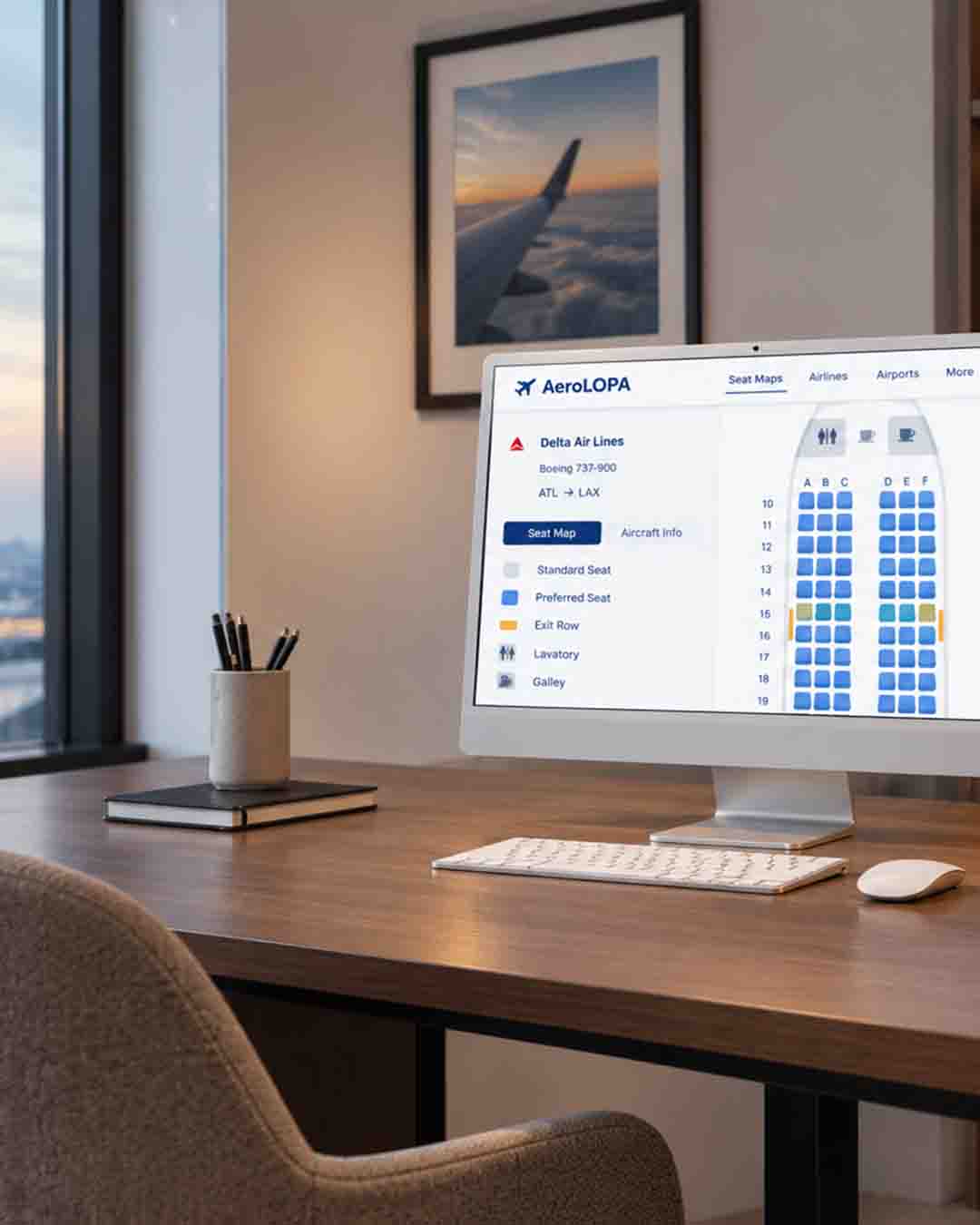
And just like SeatGuru before it shut down, AeroLOPA is a website that has detailed aircraft seat maps to help you pick a comfortable seat on a plane.
AeroLOPA have cabin layouts as detailed seat maps that you can use when researching for a flight.
What makes AeroLOPA different is that its seat maps are drawn to scale.
This means the maps are designed to show the actual aircraft cabin rather than simply showing a basic row of boxes.
AeroLOPA researches things such as the aircraft fuselage, windows, seats, bulkheads, lavatories, doors, and other cabin details when creating its maps.
This can be helpful when you want to make sure that a window seat is actually beside a window or whether a seat has less space because of something in front of it.
AeroLOPA also has information about each seat, including seat width, row pitch, recline, amenities, and seat ratings.
And if you used SeatGuru in the past, I’m sure you will notice that they only have slight differences.
Well enough rambling, let’s show you how to use AeroLOPA.
How To Use AeroLOPA To Find The Best Seat?
So how does AeroLOPA work?
Generally using AeroLOPA is pretty easy.
Here are the steps to follow using your phone or computer.
Then menu and browse or search by airline to explore their aircraft and cabin layouts.
I prefer this method because you don’t need a flight number or travel date to start looking for a seat.
You can then choose your airline and explore the fleet and see which cabin layouts it operates.
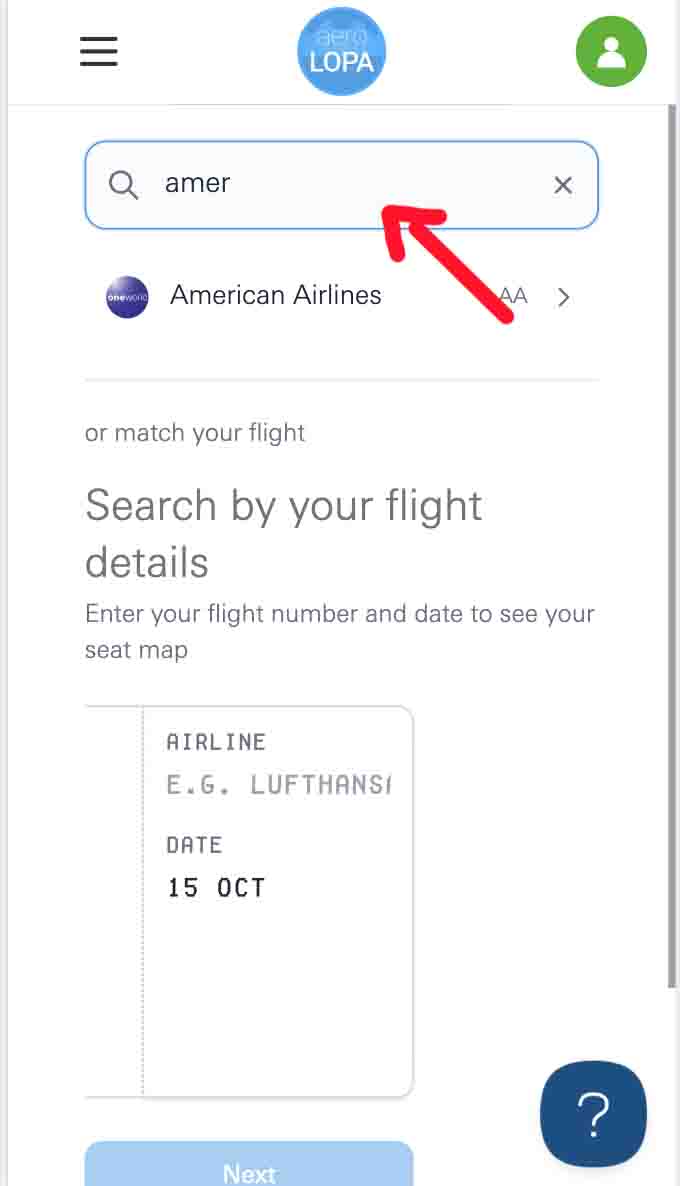
2. Find your airline
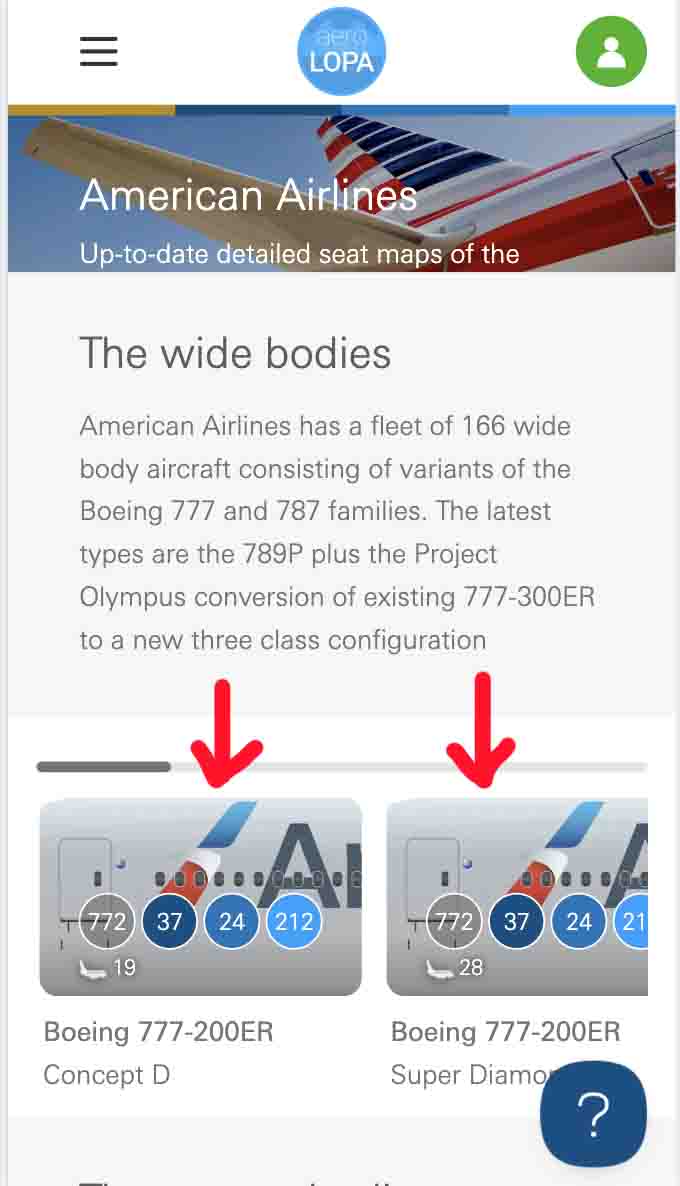
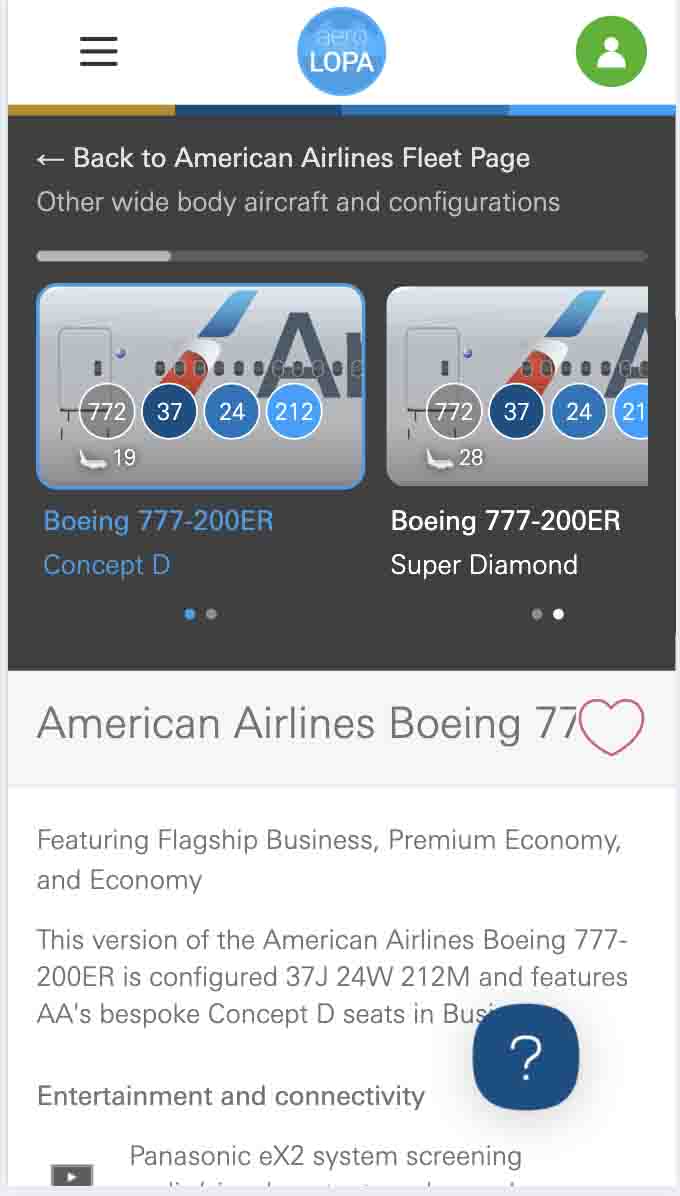
Find your airline in AeroLOPA’s list and open its page, I use American Airlines as an example.
You’ll be able to browse the aircraft and cabin for that airline.
For example, if you’re flying with an airline that operates several Boeing 777s, you may find more than one version of the aircraft, each with a different seat map.
If you haven’t booked your flight yet, this is a useful way to explore the available seating options before deciding which flight to take.
3. Select the aircraft model you want to explore
Once you’ve opened the airline’s page, look for the aircraft type that matches your flight.
AeroLOPA provides aircraft information and identifies different types using codes such as 77W for the Boeing 777-300ER.
If you already have a booking, check your airline’s website or booking details to find the aircraft type scheduled for your flight.
Keep in mind that the same airline can operate several aircraft types, so choosing the right one is important.
4. Choose the correct aircraft
Some airlines operate multiple versions of the same aircraft, and their cabin layouts can be quite different.
AeroLOPA shows different configurations where available.
Small dots underneath the aircraft tiles indicate how many variants are available, and you can select another variant to view its seat map.
For example, two Boeing 777 configurations might have different Business Class seats, Economy seating arrangements, or locations for lavatories and galleys.
If you’re checking a seat for an upcoming flight, make sure the configuration matches the aircraft your airline plans to use.
5. Explore the seat map
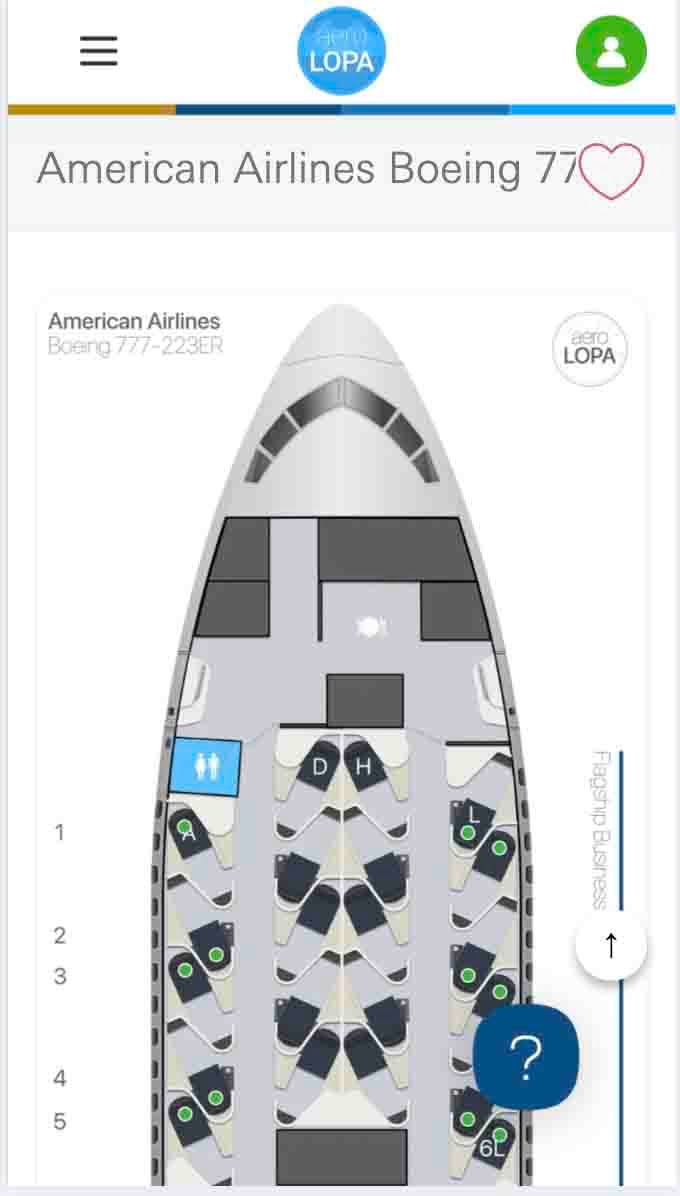
Now it’s time to take a look to the cabin.
AeroLOPA detailed seat maps show individual seats and important cabin features, including windows, lavatories, galleys, exits, and bassinets.
Depending on the aircraft, you may also find features such as bars, lounges, prayer areas, and snack stations.
Take your time exploring the layout.
Even if two aircraft have the same number of seats in a row, their cabin arrangements and seat features can differ.
6. Check individual seats
Once you’ve found the right aircraft configuration, you can start comparing seats.
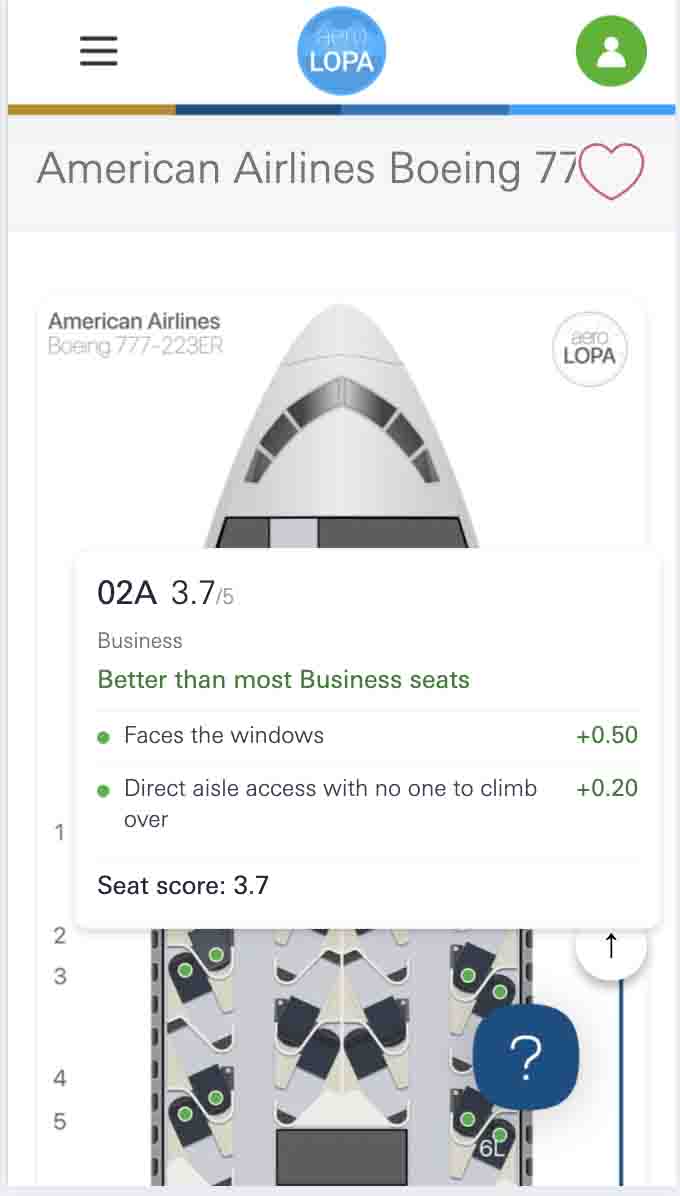
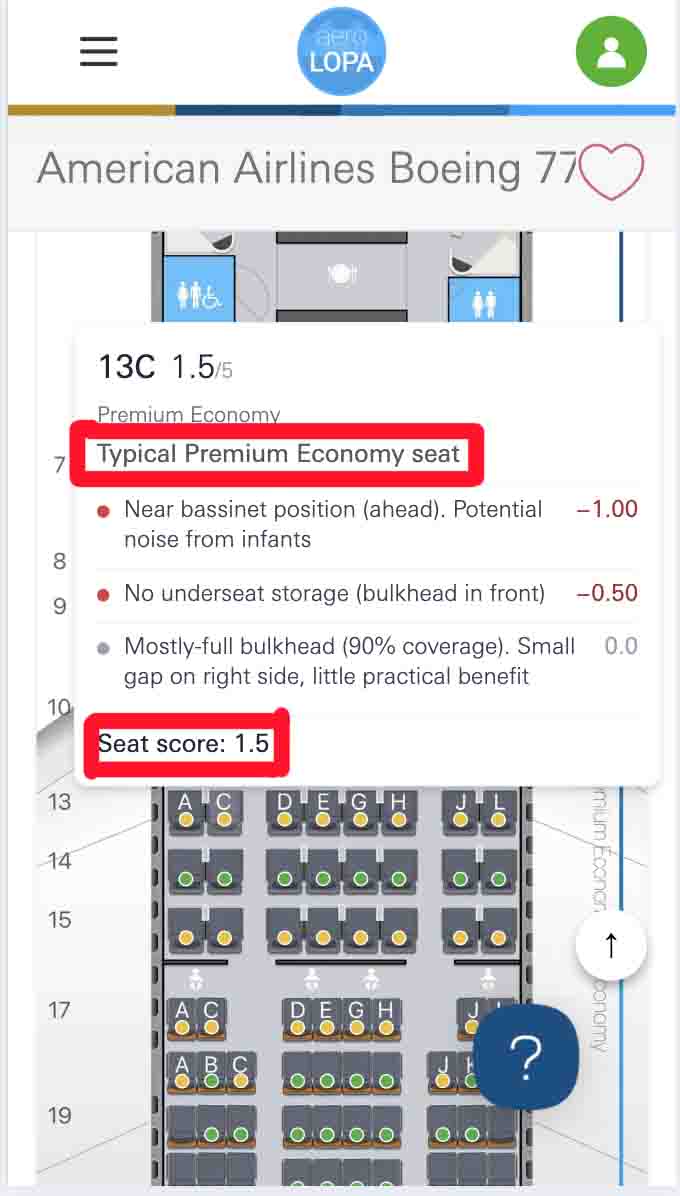
Click on a seat and to get the details about individual seats.
You can check things like:
Seat width
Row pitch
Recline
Window position
Legroom
Proximity to lavatories
Proximity to galleys
In-seat amenities
AeroLOPA also rates seats as good, be aware, or avoid.
These ratings take several factors into account, including legroom, window alignment, proximity to lavatories and galleys, and the impact of recline.
7. Compare seats and choose the one that suits you
Now that you’ve explored the seat map, compare the options based on what matters most to you.
For example, if you want a window seat, don’t just look for a seat beside the edge of the cabin.
Check where the actual window is located.
This is one area where AeroLOPA can be particularly useful because its maps show the position of the aircraft windows.
You can also avoid seats near lavatories and galleys if you’d prefer less foot traffic and noise.
Once you’ve found the seat you want, return to your airline’s website or booking platform to select it.
Keep in mind that AeroLOPA is a research tool, and your airline can sometimes change the actual seat assignment or the aircraft configuration before your flight.
Can You Search AeroLOPA By Flight Number Instead?
Yes.
If you already have a flight booked, you can use AeroLOPA’s flight search to look for the relevant seat map using your flight details.
However, I always like to search by airline first so I can have time to compare aircraft and seats before I book my flight.
What Are Popular AeroLOPA Features?
AeroLOPA have to many features that can help you compare seats and understand exactly what you’re getting.
Seat Maps
Seat maps are the main feature of AeroLOPA.
You can search by your flight or browse the available aircraft by airline.
The maps show the different cabin classes and individual seats, along with important features around the cabin.
You can see windows, lavatories, galleys, exits, bassinets, and other features depending on the aircraft.
Seat Ratings
AeroLOPA have a rate for each seat and you really need to take them by consideration:
Good: means generally a great choice.
Be aware: the seat has some cons you need to know about.
Avoid: the seat has some issues.
The ratings take in consideration things like legroom, window alignment, proximity to lavatories and galleys, recline impact, baby noise, and other factors.
Window Seat Alignment
My friend once booked a window seat, only to discover that the window was actually behind her.
And I’m sure she doesn’t use AeroLOPA.
This means you can use AeroLOPA to check whether your window seat actually has a properly aligned window before you select it
Seat Width, Pitch and Recline
AeroLOPA provides useful information about the physical characteristics of seats.
You can find details such as:
Seat width
Row pitch
Seat recline
Row pitch measures the distance from a point on one seat to the same point on the seat in front (you can use this seat pitch calculator to better understand seat dimensions.)
Seat width is measured between the armrests.
Seat recline measures how far the seat moves back from its upright position.
This information can be particularly useful when you’re choosing a seat for a long-haul flight.
Wi-Fi and Power
AeroLOPA also will help you know which amenities and technology are available on the aircraft.
The app can show your next flight and seat map, provide aircraft change alerts, show which side of the aircraft gets the sun, and allow seat maps to be used offline.
AeroLOPA is free for researching seat maps and cabin details, while the app offers additional features.
Do You Need an AeroLOPA Account?
Not always.
You can view AeroLOPA’s seat maps without an account, but you will need to sign up to see some feature.
AeroLOPA says signing in unlocks features such as cabin details, seat recommendations, saved aircraft, and flight history.
So if you only want to look at a seat map, you don’t need to create an account.
But the good thing is that you can easily sing in, using an email in under 10 seconds.
Are There Any Alternatives To AeroLOPA?
AeroLOPA isn’t the only website or service you can use to research airplane seats.
However, it is one of the most detailed options available, especially if you want to see the physical layout of the aircraft.
Here are some alternatives you can also consider:
1. ExpertFlyer
ExpertFlyer.com is a paid service with several tools for frequent flyers.
Depending on the plan, you can use it to check seat availability, and receive alerts when certain seats become available.
2. SeatMaps
SeatMaps.com is another website that you can use to explore airline seat maps and compare aircraft cabins.
It can be useful as another source when you want to compare different seat maps.
3. Airline Websites
Don’t forget about the airline itself.
Your airline’s website is still one of the best places to check the seat map attached to your actual booking.
This is especially important if you’re worried about an aircraft change.
Final Thoughts
AeroLOPA is a my favorite website if you I want to find a better seat before a flight.
It gives detailed aircraft seat maps, shows me where the windows and other cabin features are located, and provides information about things like seat width, row pitch, recline, Wi-Fi, power, and entertainment.
I especially like that AeroLOPA shows different aircraft configurations because airlines don’t always use the same cabin layout on every aircraft of the same type.
If you used SeatGuru in the past, AeroLOPA is definitely worth checking out.
Just remember to take a look at the exact aircraft and configuration for your flight, and it’s still a good idea to compare the information with your airline’s own seat map before you travel.
I hope this helps.
Happy travels.
AeroLOPA Frequently Asked Questions (FAQ)
How do I find my exact aircraft model if my ticket only says “Boeing 777” or “Airbus A320”?
You can find your booking details on your airline website. If you can’t find the exact model, enter your flight number on a flight tracking website like flightradar24.com to see which aircraft is planned for your flight.
How do I check legroom, recline, tray tables, and power outlets on AeroLOPA?
Open the correct seat map and click on a seat to see its details. You can check the legroom, seat width, recline, and available features.
Does AeroLOPA show real-time seat availability?
No, AeroLOPA doesn’t show which seats are available to book right now. To check available seats, visit your airline’s website or app.
What happens if the airline changes the aircraft at the last minute?
Your seat might change if the airline uses a different aircraft. Check your booking for updates, then look up the new aircraft on AeroLOPA to see where your new seat is located.
How is AeroLOPA different from SeatGuru?
AeroLOPA shows detailed seat maps with the real positions of windows, seats, and other cabin features. SeatGuru was known for its color-coded seat ratings and passenger reviews. AeroLOPA is a good choice if you want to see the cabin layout in detail.
How can I tell which seats have missing or misaligned windows?
Open your aircraft’s seat map and check where the windows are in relation to each seat, you can see small dots in the wall that looks like windows. This helps you find seats with no window or a window that doesn’t line up properly with your seat.
How do I find the best seat for my travel needs?
It depends on what you want. If you’re tall, look for seats with more legroom. If you’re traveling as a couple, look for two seats together. If you want a quieter flight, avoid seats near the toilets and galleys.
What hidden “trap” seats should I look out for?
Watch out for seats with no window, seats that don’t recline much, and seats near toilets or galleys. Some seats near exit rows or walls may also have less space than you expect, so take your time and check the seat map before choosing.
Gargie, is writer, traveler & a digital marketing specialist
passionate about traveling and exploring new cultures. She is a savvy traveler who likes to pack light, testing various luggage brands and seeking out budget-friendly airline options. Gargie enjoys creating unique recipes when she’s not on the go.