Whether you want to check in online through the Cathay Pacific website, use the mobile app, or check in at the airport, in this detailed guide I will walk you through every step and shows you how to get your Cathay Pacific boarding pass.
I will also cover how early you can check in, how to choose your seat, when to arrive at the airport, and what to do if Cathay Pacific online check-in isn’t working.
Let’s find out how Cathay Pacific check-in works.
Key Takeaways:
You can check in online for Cathay Pacific starting 24 hours before departure.
If you are a Cathay member then you can enjoy priority online check-in up to 48 hours before departure when their membership is linked to the booking.
You can check in through the Cathay Pacific website or mobile app.
You can also check in at selected airport self-service kiosks or at the Cathay Pacific check-in counter.
You can choose an available seat during online check-in.
You can receive a digital boarding pass on selected flights and at selected airports, or collect a printed one at the airport.
If you have checked baggage, you still need to drop it off at the airport before the baggage drop deadline.
Cathay Pacific check-in counters generally close 60 minutes before departure, but some airports have different deadlines.
Boarding gates close 15 minutes before departure, so make sure you arrive at your gate on time.
How Early Can You Check In for a Cathay Pacific Flight?
According to Cathay Pacific, regular passengers can check in online starting 24 hours before their scheduled flight departure.
If you are a Cathay member and your membership number is linked to your booking, you can enjoy priority online check-in starting 48 hours before departure.
You can check in through the Cathay Pacific website or mobile app.
As for airport check-in, Cathay Pacific counters generally close 60 minutes before departure.
Closing times can vary depending on your departure airport.
For example, counters in Hanoi and Ho Chi Minh City close 50 minutes before departure, while some airports in mainland China have different deadlines.
How to Check In for Cathay Pacific Website?
Checking in online is usually the easiest option because you can complete most of the process before arriving at the airport.
And there are several ways to check in for your Cathay Pacific flight:
Using the Cathay Pacific website or mobile app
Check in at a self-service kiosk at the airport
At the Cathay Pacific airport check-in counter
How to Check In Online for Cathay Pacific?
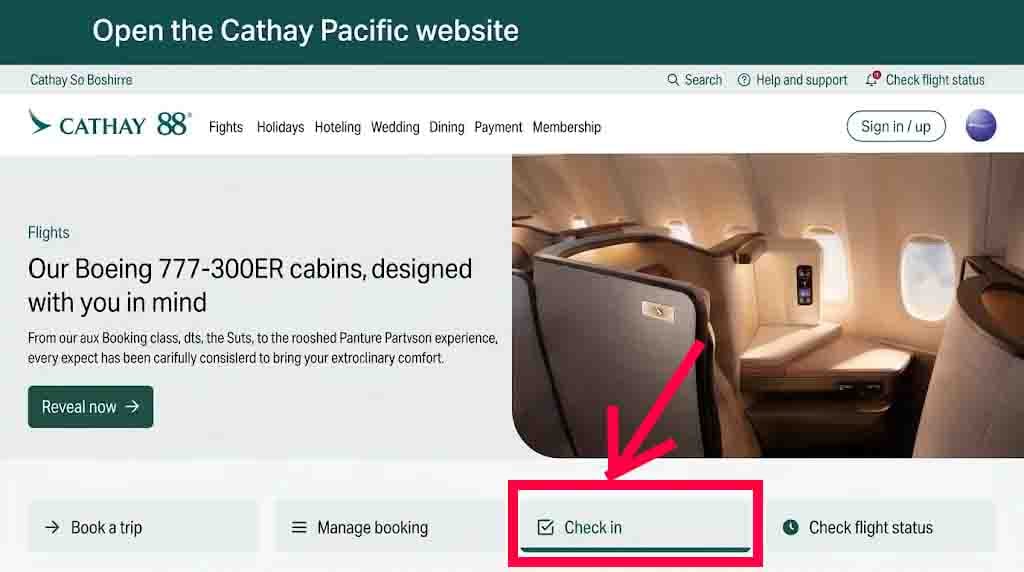
Here is how to check in online, using the Cathay Pacific website:
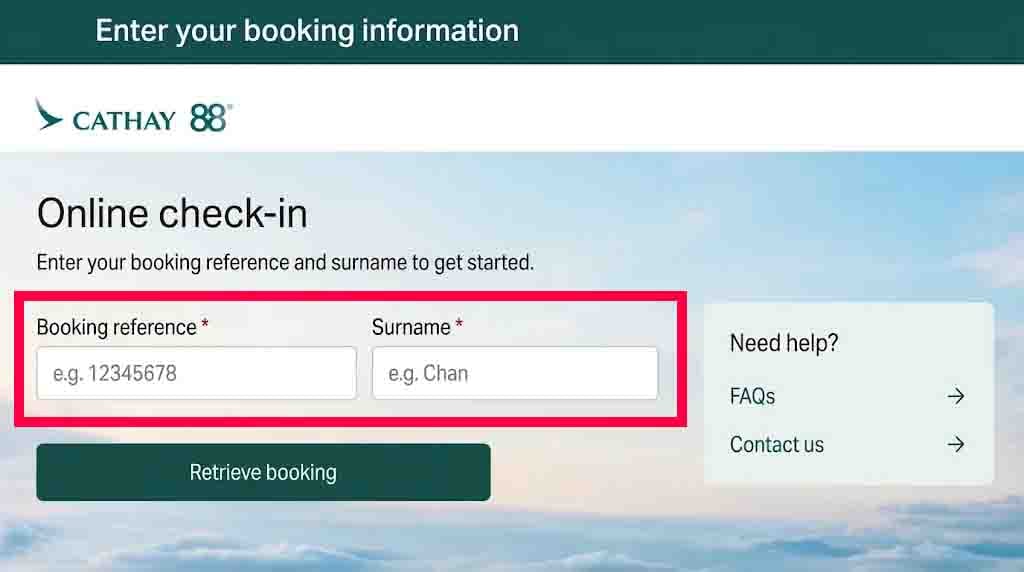
Then you will need your booking reference or e-ticket number and your passenger details to get your booking.
Double check that you enter your name exactly as it appears on your ticket.
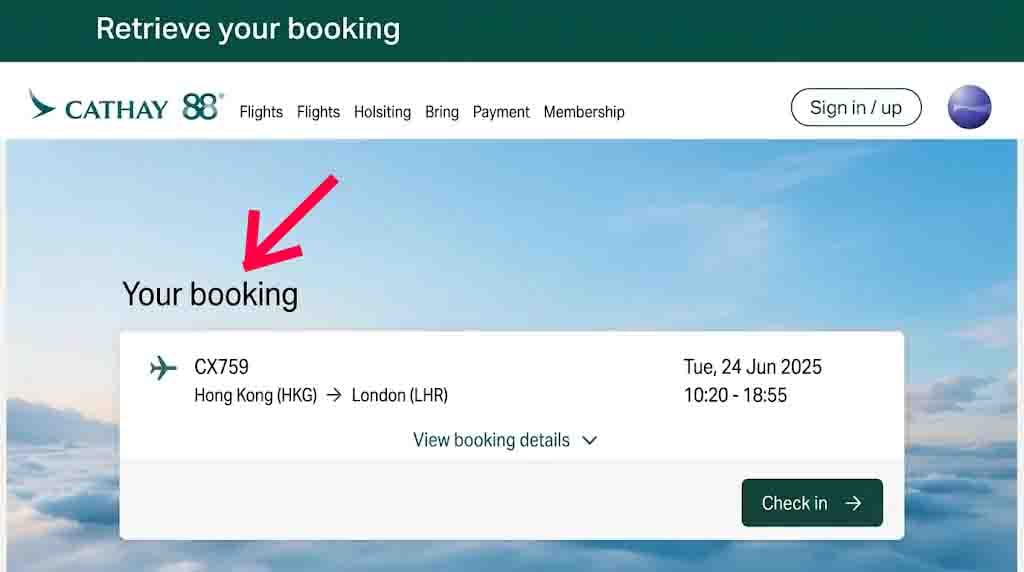
Select your booking
After you enter the exact details, select your booking and the flight you want to check in for.
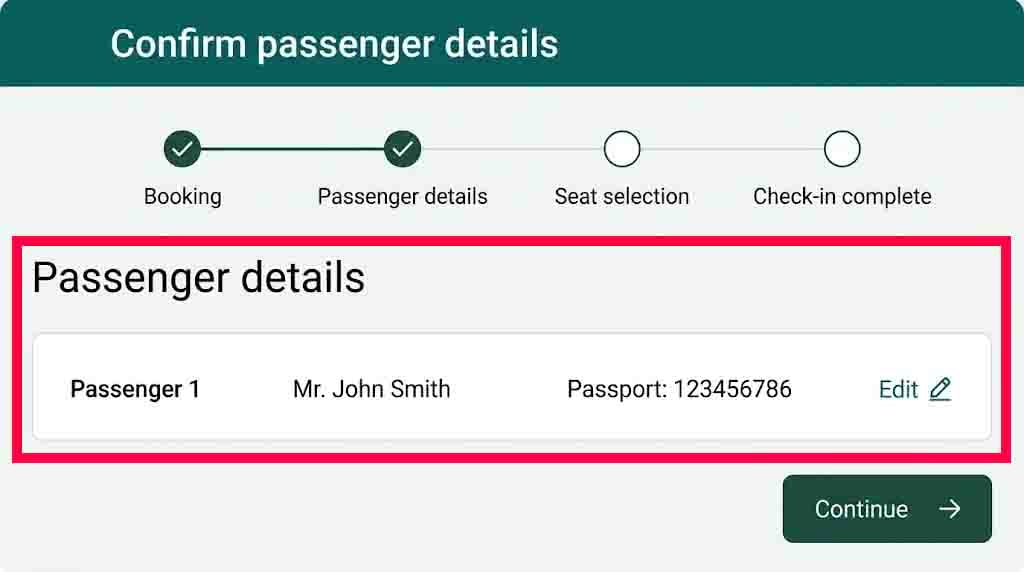
Confirm your details
Take a second look at your information and you an also edit them, enter any requested travel document details, such as your passport information.
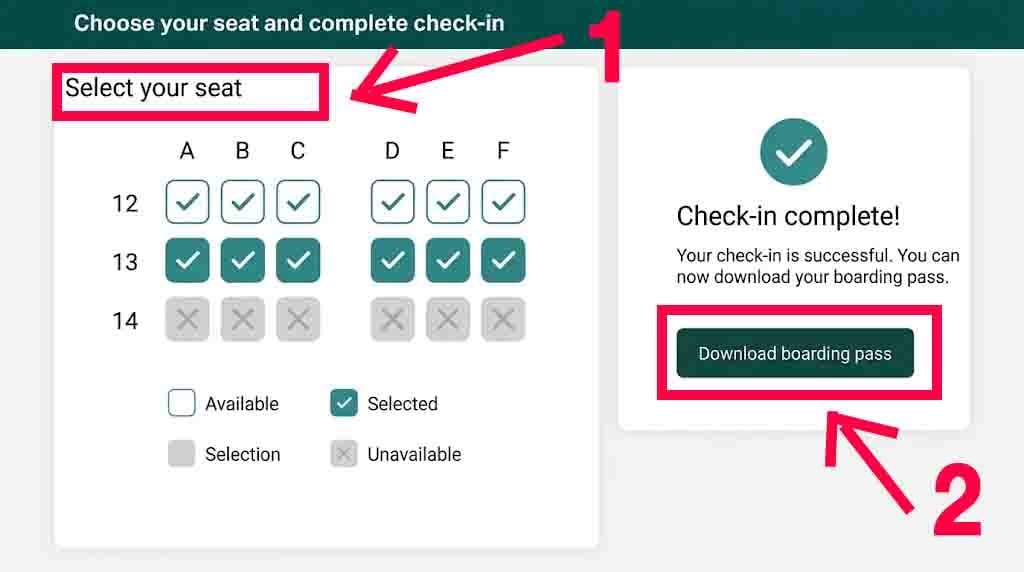
Choose your seat and complete check-in
You can select an available or your preferred seat during the check-in process.
If you have already selected a seat, you may be able to review or change it, depending on availability and your ticket conditions.
Follow the steps and confirm your check-in.
Once completed, you can collect your boarding pass if it is available for your flight and departure airport.
You can also use the website to manage your booking and review your flight details.
Take a screenshot of your boarding pass or save it to your phone before heading to the airport. It is also a good idea to keep your booking confirmation and passport handy.
How to Check In Using the Cathay Pacific App?
You can also check in using the Cathay Pacific mobile app instead of visiting the website, and the steps are almost the same.
You can get the app for iPhone and iPad in Appstore, and you can find it on Google Play for Android devices.
The app will also let you manage your booking, check flight information, and access your boarding pass.
Here is how to check in using the app:
Open the Cathay Pacific app.
Sign in to your Cathay account or retrieve your booking.
Go to your upcoming trips and select your flight.
Tap the Check-in option when it becomes available.
Follow the instructions and confirm your details.
Choose the available or preferred seat.
Complete check-in and get your boarding pass.
How to Check In at the Airport Using a Self-Service Kiosk?
If you prefer checking in at the airport, you can use a Cathay Pacific self-service kiosk at some airports.
The process is generally easy:
Find a Cathay Pacific self-service kiosk in the airport.
Follow the screen instructions to get your booking.
Enter or scan your travel information.
Select your flight and confirm your details.
Choose your seat if available.
Print your boarding pass and baggage tags if the kiosk offers these services.
If you have checked bags, attach the baggage tags and take your bags to the designated bag-drop counter.
Keep in mind that self service kiosks are not available on all airports, and some passengers may need to check in at the counter instead.
How to Check In at the Cathay Pacific Airport Counter
If you don’t want to check in online or use a kiosk, you can always check in at the Cathay Pacific airport counter.
Simply head to the Cathay Pacific check-in area and present your passport and booking details to the airline staff.
The staff will help you:
Find your booking.
Take a second look to your travel documents.
Select an available seat, if needed.
Check your baggage and attach a tag.
Issue your boarding pass.
Keep in mind that airport check-in counters generally close 60 minutes before departure, although the deadline varies at some airports.
So make sure that you show up to the airport early.
How to Get Your Cathay Pacific Boarding Pass?
After checking in online, you can get your boarding pass in several ways:
Receive your boarding pass electronically if your flight and departure airport support it.
Request a digital boarding pass or print a paper copy at a participating airport.
Get your boarding pass from the Cathay Pacific check-in counter.
Not every passenger can receive a digital boarding pass.
For example, passengers traveling with an infant fare or certain unaccompanied minors may need to collect their boarding pass at the airport.
If you receive a digital boarding pass, save it to your phone before going to the airport.
You don’t necessarily need to print it, but it is better to print it in case your phone battery died.
What to Do If Cathay Pacific Online Check-In Is Not Working?
If you cannot check in online for your Cathay Pacific flight, don’t panic, it is a normal thing and here are several possible reasons.
Your e-ticket hasn’t been issued or updated correctly.
You are trying to check in for a connecting flight before checking in for the previous flight in your itinerary.
Your booking requires additional payment.
You are travelling as an unaccompanied minor or need special medical assistance.
Your flight is operated by another airline, and online check-in is not available through Cathay Pacific.
Cathay Pacific also asks some passengers to complete check-in at the airport instead of online.
If online check-in isn’t working, try retrieving your booking again or contact Cathay Pacific for help.
You can also visit the airport check-in counter and ask the staff to check you in.
How Early Should You Arrive at the Airport for a Cathay Pacific Flight?
Cathay Pacific recommends arriving at the airport at least 2 hours before your scheduled departure so you can have enough time for check-in, baggage drop, security, and immigration.
If you are travelling internationally, have checked baggage, or are departing from a busy airport, arriving earlier is a good idea.
Don’t forget that checking in online doesn’t mean you can arrive at the airport just before departure.
You still need enough time to drop off your luggage and complete the airport formalities.
When Does the Cathay Pacific Boarding Gate Close?
Cathay Pacific boarding gates close 15 minutes before departure.
Boarding generally begins 35 minutes before your flight departure, so make sure you are at the gate early and pay attention to the boarding announcements.
Your boarding pass shows your boarding group, gate number, and boarding time.
If you arrive after the gate closes, you may not be accepted for travel.
Final Thoughts
Checking in for your Cathay Pacific flight is easy using the airline website or mobile app.
Online check-in starts 24 hours before departure for regular passengers and up to 48 hours for eligible Cathay members.
You can also check in at the airport using a self service kiosk or at the Cathay Pacific check-in counter.
If online check-in doesn’t work, don’t worry.
You can still ask the airport staff for help and get your boarding pass at the counter, provided you arrive before the check-in deadline.
I hope this guide helps.
Happy travels.
Frequently Asked Questions About Cathay Pacific Check-In
When can you check in for Cathay Pacific?
You can check in online starting 24 hours before your flight departure. If you are a Cathay member with eligible bookings you can check in up to 48 hours before departure.
Can you check in online for Cathay Pacific?
Yes, you can check in online through the Cathay Pacific website or mobile app. You can get your booking details, choose an available seat, and get your boarding pass if it is available for your flight.
Can you check in at the airport for Cathay Pacific?
If you don’t want to bother yourself with online check in, you can always check in at a Cathay Pacific airport counter in person or use a self-service kiosk at the airport.
Can you check in online if you have checked baggage?
You can check in online even if you have many checked bags. But, you will still need to drop off your luggage at the check in counter before the deadline.
Do you need to print your Cathay Pacific boarding pass?
You don’t always need to print your boarding pass. You can use a digital boarding pass on your phone if your flight and departure airport support it. Otherwise, it is always a good idea to print your boarding pass.
Can you check in for other passengers on the same booking?
Yes, you can check in your traveling companions who are included in the same booking, provided they are eligible for online check-in.
Why can’t I check in online for Cathay Pacific?
You may can’t check in online because your ticket hasn’t been issued, your itinerary needs to check-in in a specific order, or your booking needs additional verification, especially when traveling internationally.
How early should you arrive at the airport for a Cathay Pacific flight?
Cathay Pacific advises arriving at least 2 hours before your flight departure, just make sure to always allow extra time if you need to check baggage or complete additional travel document checks, or even having a snack at the airport.
When does the Cathay Pacific check-in counter close?
Cathay Pacific check-in counters generally ends 60 minutes before flight departure, but some airports have different closing times, so check the deadline for your exam flight departure airport.
When does the Cathay Pacific boarding gate close?
Cathay Pacific boarding gates close 15 minutes before departure. Boarding generally begins 35 minutes before departure.
Can you choose your seat during Cathay Pacific online check-in?
You can select an available seat during online check-in, but you may need to pay to select some seats.
Gargie, is writer, traveler & a digital marketing specialist
passionate about traveling and exploring new cultures. She is a savvy traveler who likes to pack light, testing various luggage brands and seeking out budget-friendly airline options. Gargie enjoys creating unique recipes when she’s not on the go.